
Magento Integration
MISpay offers a dedicated module for Magento, providing a robust and scalable solution for merchants using this powerful e-commerce platform.
📦 What It Does:
This Magento 2 extension allows merchants to offer MISPay’s BNPL (Buy Now, Pay Later) service during checkout. It integrates MISPay as a custom payment gateway, so customers can choose to pay in installments via MISPay.
🚀 Step-by-Step Installation Guide
✅ Step 1: Installation
Download and Install Megento Extension from the below link:
https://github.com/mispay-bnpl/mispay-magento2-extension.git
composer require mispay/mispay-magento2-payment-method
bin/magento setup:upgrade

To enable it MISPay\_MISPayMethod;
bin/magento module:enable MISPay\_MISPayMethod
⚙️ Step 2: Configure Sandbox Settings in Admin
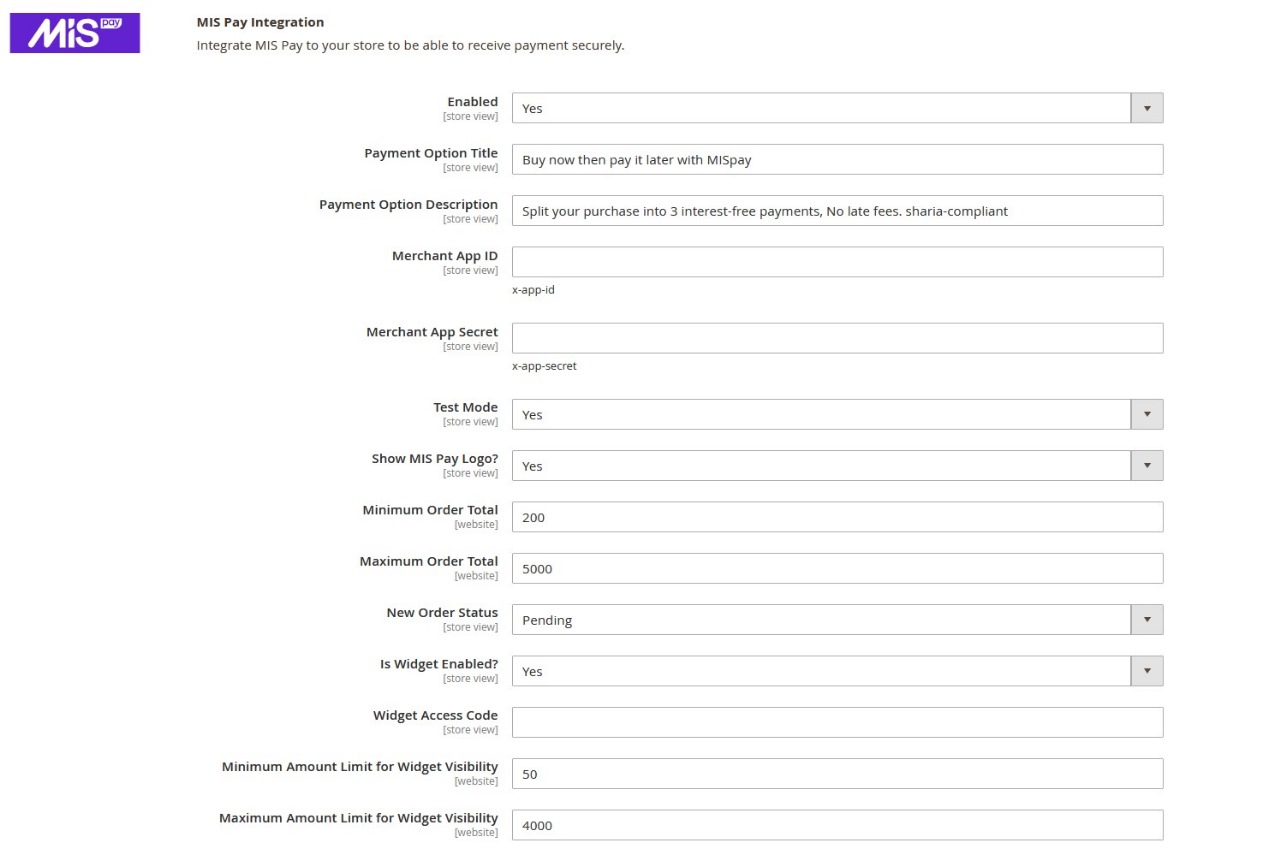
- Log in to Magento Admin
- Navigate to: Stores → Configuration → Sales → Payment Methods
- Locate MISPay
- Set:
- Enabled: ✅ Yes
- Test Mode:
Yes - API Keys: Enter sandbox credentials provided by MISPay (App ID, App Secret, and Widget Access Code)
- Click Save Config
- Run cache flush:
php bin/magento cache:flush🧪 Step 3: Test in Sandbox Mode
-
Go to your storefront.
-
Add product to the cart.
-
Proceed to checkout.
-
Select MISPay as the payment method
Test Credentialsafter completing setup, please notify MISpay support team, so they can provide you with:
- test phone number with static otp
- test credit card with static otp
-
Complete the transaction, and try multiple senarios.
🌍 Step 4: Switch to Live Environment
once you complete your testing in the Sandbox enviroment. you can now enable MISpay on production:
- Go to: Stores → Configuration → Sales → Payment Methods → MISPay
- Set:
- Test Mode:
Yes - API Keys: Use live credentials from MISPay (App ID, App Secret, and Widget Access Code)
- Enable: Yes
- Test Mode:
- Save configuration.
⚠️ Final Steps Before Launch
- Ensure order statuses are syncing correctly
- Check that the success/cancel URLs redirect properly
Updated 5 months ago